Why not use Teams, Zoom or Google Meet?
You can hold a meeting on Teams, Zoom or Google Meet, and many centres do. The difference comes afterwards. With those services the recording is saved in the organiser's own storage (OneDrive, Google Drive, Zoom's cloud or the assessor's computer), so someone has to download it, find the right candidate's portfolio and upload it again. It is too easy to download or upload the incorrect file, possibly causing data protection violations.
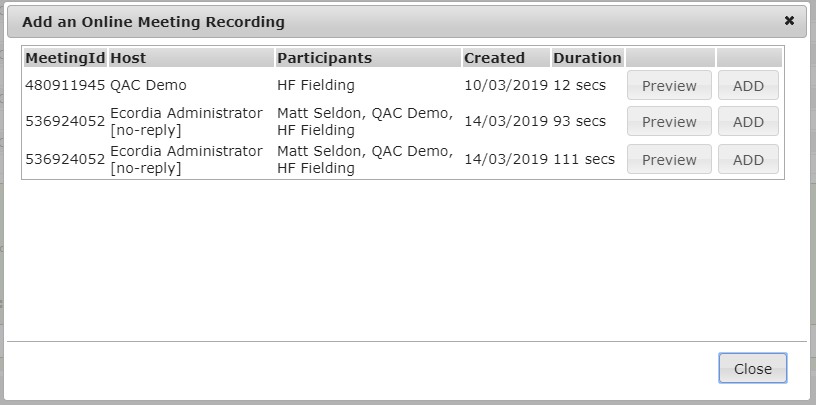
With Ecordia Online Meetings the meeting happens inside Ecordia. The assessor simply goes to the candidate portfolio and selects the recording. It even displays the name of the candidate (or any participant) to confirm the correct recording file:
Candidates, employers and expert witnesses join from the link they're sent, in their browser. Your centre has no separate system to set up, and you decide who may host, how many people can join and how many minutes each person can use.
Yes, Ecordia Online Meetings does cost, but in reality it is excellent value for money. It makes the process significantly easier for staff and crucially, your candidates. You can start using Ecordia Online Meetings for just £13 per month, try it and see just how popular and useful it will become.
Comparison Table
Of the four, only Ecordia puts the recording straight into the candidate's portfolio.
Yes
Microsoft Teams ✕Separate service
Zoom ✕Separate service
Google Meet ✕Separate service
Straight into the portfolio, with the participant's name shown
Microsoft Teams The organiser's OneDrive. Download it and upload it yourself
Zoom Your computer (free plan) or Zoom's cloud (paid plans). Download it and upload it yourself
Google Meet The organiser's Google Drive. Recording needs a paid plan. Download it and upload it yourself
Yes, nothing to download
Microsoft Teams ✓Yes, in Edge or Chrome, without a Teams account. Your settings may ask for a passcode
Zoom ✓Yes, without a Zoom account. The browser version has fewer features
Google Meet ✓Yes. Guests without a Google account must be let in
Unlimited storage
Microsoft Teams 120 days by default (your administrator can change this)
Zoom Free plan: on your computer. Pro plan: 10 GB of cloud storage per licence
Google Meet In the organiser's Google Drive
Checked 11th November 2026 against each provider's published information. Plans, prices and settings change; see each provider's website for current details. Microsoft Teams, Zoom and Google Meet are trade marks of their owners.
What it costs a centre with 150 candidates
a one-hour progress review with the candidate, their employer and the assessor
a year for every candidate's progress review every three months: 600 reviews for 150 candidates
the mileage for the same 600 reviews in person, at 20 miles a round trip and 55p a mile
Illustration. Uses the Online Meetings prices on this page (£0.0054 to £0.0062 per minute per person); a one-hour meeting of three people uses 3 × 2 × 60 = 360 minutes. Reviews every three months is the minimum in the Department for Education's apprenticeship funding rules 2026 to 2027. Recording is extra, at 2.5p a minute. One-off setup £195. Mileage at HMRC's approved rate of 55p a mile.